
For beginners to add an article in MC is very difficult task because they don’t know about their types, classification, difference between store unit and base unit. Below added Pictures of adding an article in MC will also help you to understand this in better way.
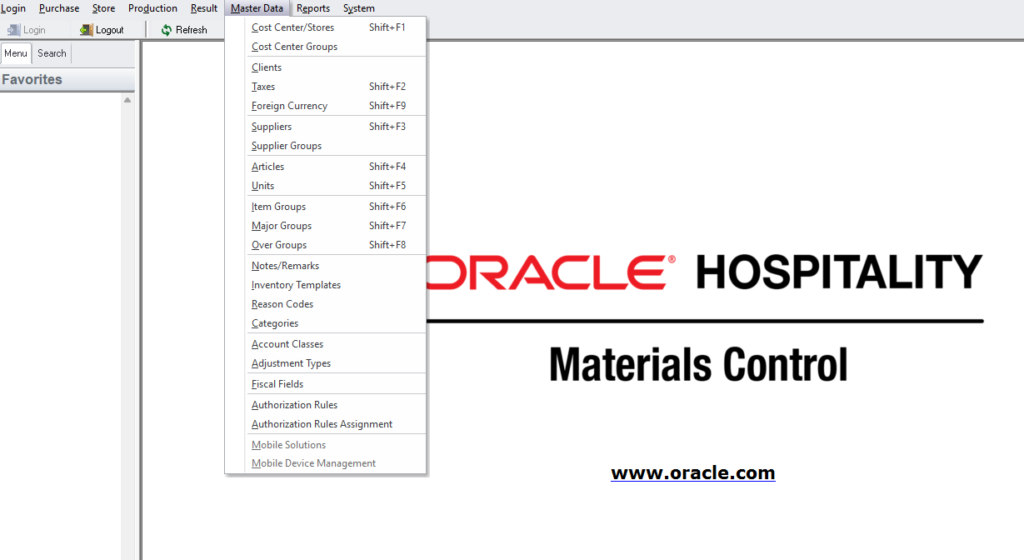
- Selecting Module
- Master Data
- Articles
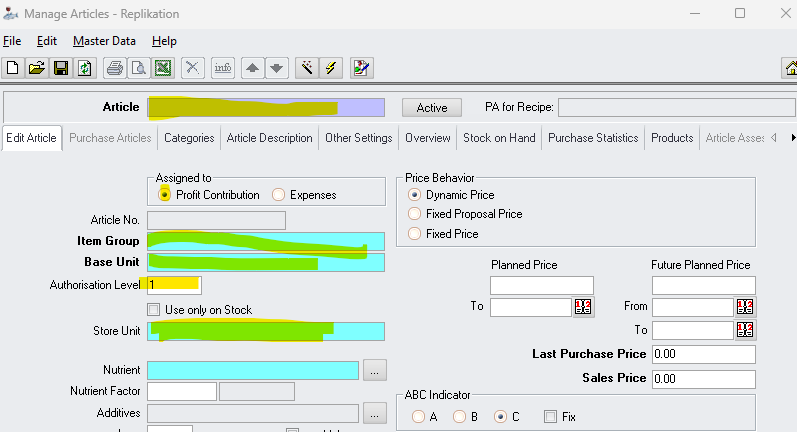
- Name
- Items Group
- Base Unit
- Store Unit
In any hotel or inventory-based organization, the Material Control (MC) system serves as the backbone of stock and cost management. Every item that is purchased, stored, or issued must first exist in the system as an article. Without properly creating an article, no transaction can be processed, which makes this step both fundamental and critical.
Adding an article is not just a technical task; it reflects how well the organization maintains control over its inventory. A properly created article ensures smooth purchasing, accurate stock tracking, and reliable financial reporting. On the other hand, poorly defined articles can lead to confusion, stock errors, and incorrect cost calculations.
Accessing the Article Creation Section
The process begins by logging into the MC system using authorized credentials. Access control is important because not every employee is allowed to create or edit articlesin Mc, mostly its done by Storekeeper or Cost controller.
After logging in, the user navigates to the inventory or master data module. Depending on the system version, this section may be labeled as “Item Master,” “Article Master,” or simply “Inventory Setup.”But in MC I used is “Articles in Master Data Module” available. Within this module, the option to create a new article is selected, opening a form where all relevant details must be entered.
As shown in picture.>>>>
Defining the Article Name and Code
The first and most visible step is entering the article name. This may sound simple, but it requires attention. The name should be clear, specific, and easy to understand for anyone using the system. For example, instead of a vague name like “Oil,” a more descriptive name such as “Sunflower Oil 1L” provides clarity and avoids confusion during daily operations.
Because all departments use MC to request items from store so you need to create an article in such way that everyone can understand it and make his request by his own. If you make it difficult this will increase difficulties for you and purchasing department in future.
Along with the name, each article is assigned a unique code. In some systems, this code is generated automatically, while in others it must be entered manually. The coding structure often follows company standards, and consistency is important for maintaining organized records.
In most and advance versions its automatically created.
Selecting the Correct Item Group
One of the most important steps in article creation is assigning the correct item group. Item groups classify articles into categories such as Food & Beverage, Housekeeping Supplies, Engineering Items, or Stationery.
Not only items group also sub groups like sugar, fruits, vegetable, etc.
This classification is not just for organization; it directly impacts reporting and cost analysis. Management relies on these groups to evaluate departmental expenses and monitor consumption patterns. Selecting the wrong group can lead to inaccurate reports and misinterpretation of data, which can affect decision-making at higher levels.
Setting the Unit of Measure
The unit of measure defines how the item will be handled in the system. It determines how the article is purchased, stored, and issued. I will like to clear that base unit is same for article always but unit of storing and purchasing always chages. Common units include kilograms, liters, pieces, cartons, and boxes.
Choosing the correct unit is essential because all inventory transactions depend on it. For instance, if rice is stored in kilograms but entered as pieces, it will create confusion and stock discrepancies. Once transactions begin, changing the unit can be complicated, so it is important to get it right from the beginning.
Entering Pricing and Cost Details
Another key aspect of article creation is defining the pricing or cost of the item. This may include purchase price, standard cost, or average cost, depending on the organization’s system setup.
But we use price quotations option to enter the prices of all articles from all our suppliers. That we will use for PR making before getting approval from FC, DFC, GM.
Accurate pricing is crucial for cost control and financial reporting. Even small errors in price entry can lead to significant differences over time, especially for frequently used items. In some systems, prices are updated automatically through purchase transactions, while others require manual updates.
Assigning Storage Location
Many MC systems require assigning a storage location or warehouse to the article. This indicates where the item will be physically stored, such as the main store, cold room, or beverage store.
In 2026 versions just add article no need to define that where you will store article etc as one items can be used by 2 3 departments at a same time so its for all.
Proper location assignment helps in efficient stock management and makes it easier to locate items during issuing and stocktaking. It also supports better organization within the store, reducing delays and improving operational efficiency.
Managing Stock Levels
An important but sometimes overlooked feature is setting minimum and maximum stock levels. These limits help maintain balance in inventory by preventing both shortages and overstocking.
While going to store module and selecting “stock on hand” Of a specific store will give you options to set minimum and maximum stock levels so you can see reports easily by using that options.
When stock falls below the minimum level, the system can generate alerts for reordering. Similarly, the maximum level ensures that excessive quantities are not purchased, which can lead to wastage or unnecessary storage costs. This is particularly important for perishable goods in hotel operations.
Adding Additional Details
Depending on the system, additional fields may be available during article creation. These can include supplier details, brand name, item description, and tax information. Linking a preferred supplier can simplify the purchasing process, while detailed descriptions improve item identification.
Although some of these fields may seem optional, filling them properly enhances the overall efficiency of the system and reduces the chances of errors in future transactions.
Reviewing and Saving the Article
Before saving the article, it is important to review all entered information carefully. This step is often ignored in busy work environments, but it can prevent major issues later.
Once an article is used in transactions, certain fields become difficult or impossible to modify. Errors in unit, group, or pricing can create long-term complications. Taking a few extra moments to verify details ensures accuracy and saves time in the future.
After confirmation, the article is saved and becomes active in the system.
Role of Articles in Daily Operations
Once created, the article becomes part of the entire inventory cycle. It is used in purchase orders, goods receiving, stock transfers, and issuing to departments. It also appears in various reports such as stock balance, consumption reports, and cost analysis.
This highlights how a single article entry connects multiple functions within the organization. Proper article creation supports smooth coordination between departments and improves overall workflow.
Practical Challenges and Best Practices
In real working conditions, adding articles is a routine activity, but it requires consistency and attention to detail. New users may find it slightly complex at first, especially when dealing with multiple fields and system requirements.
Following standard procedures and company guidelines is always recommended. Some organizations implement approval processes or maintain predefined templates to ensure accuracy and uniformity. Developing a habit of double-checking entries and using clear naming conventions can significantly improve data quality.
Adding an article in the MC system may appear to be a basic task, but it carries significant importance in inventory and cost management. It serves as the foundation for all stock-related activities and directly influences reporting accuracy and operational efficiency.
By carefully entering correct details, selecting appropriate classifications, and reviewing information before saving, organizations can ensure a reliable and well-structured inventory system. In the long run, this attention to detail contributes to better control, reduced errors, and more effective decision-making.